the software office of mitch haile

This FAQ refers to my office pictures on flickr. These are (mostly) real questions people have asked on flickr or other forums. You can follow me on Twitter.

Last updated: 1 August 2009 -- General page tweaking. You can see some 2010 updates here.


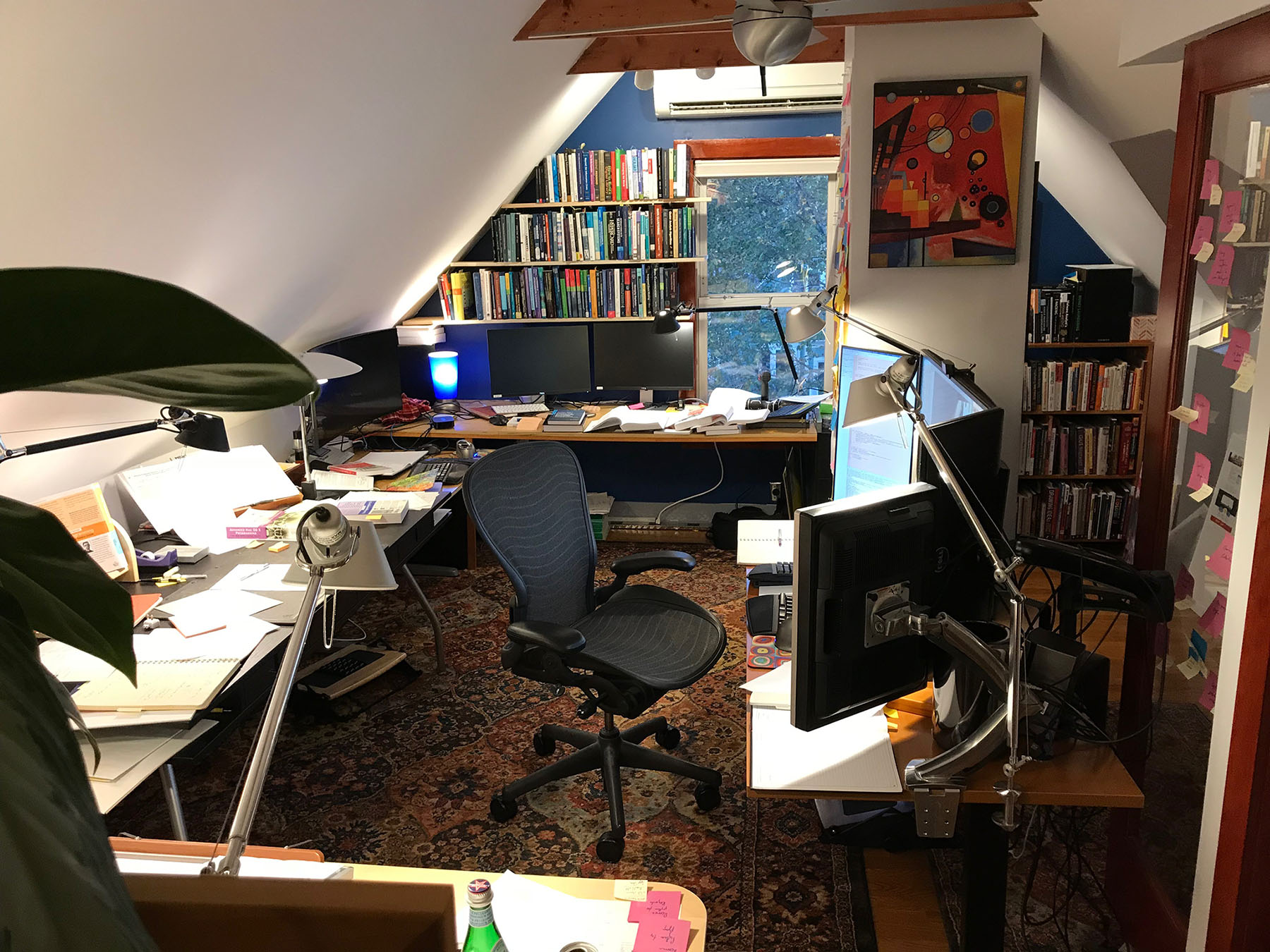
Room overview (click for larger).


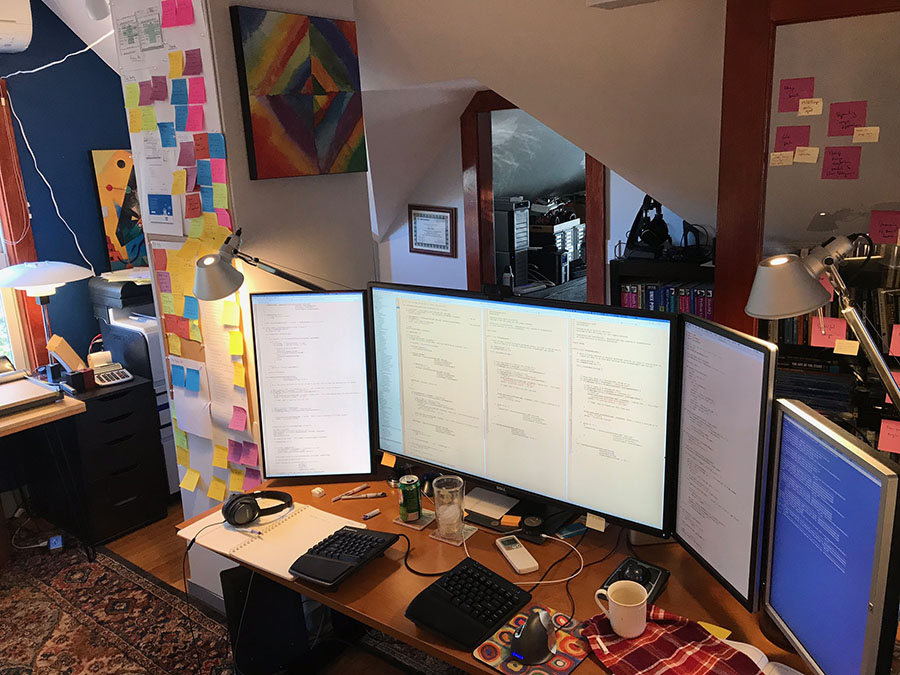
Monitor Area (click for much larger).


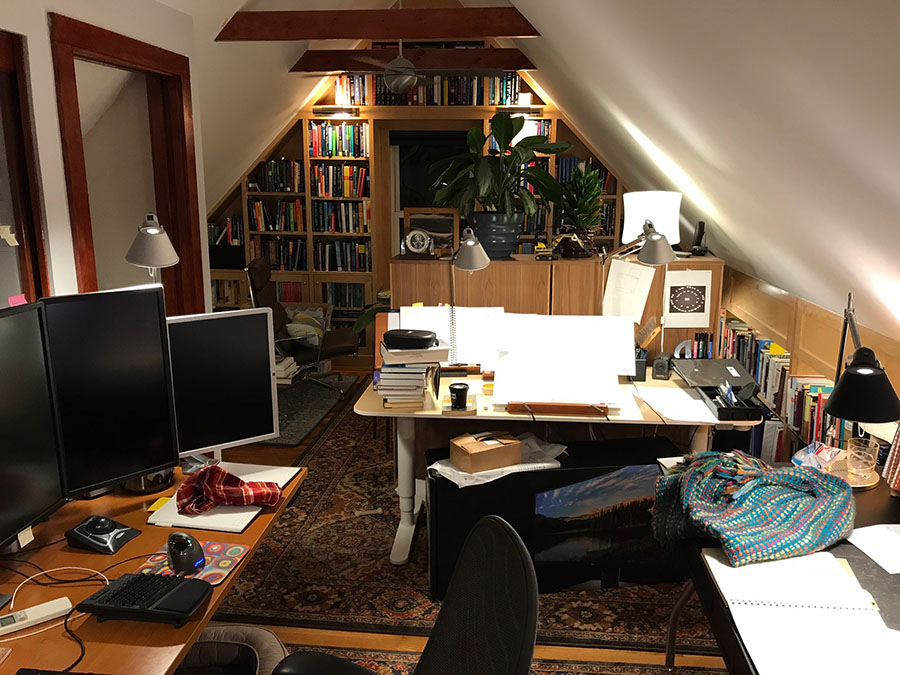
Desk overview, standing near the printers.


Looking down.


Looking towards the front. 80" projector screen. Low res, but has a number of interesting use cases, which I am still exploring.


Front desk overview. Note the outlets on the wall that are above the desk height.


Workstation: 8 core Mac Pro, 24 GB of RAM, 8 TB of hard drives, 3 video cards.


Cable management. 3 Ikea Signum trays. AC and data lines are separated by a few inches. Power bricks, power strips into separate UPSes, USB hubs hidden in the mess.


Kinesis Freestyle keyboard with custom cabling.


Printers and stereo. The left printer is a Canon laser multi-function, the other printer is a Lexmark color laser. An AirPort Express lurks behind the cabinet for AirTunes. LED ropelights behind the cabinets provide light without taking up any top surface area.


Snack bar area. I spend a lot of time on conference calls and don't always get a chance to run to the kitchen for a snack between meetings.


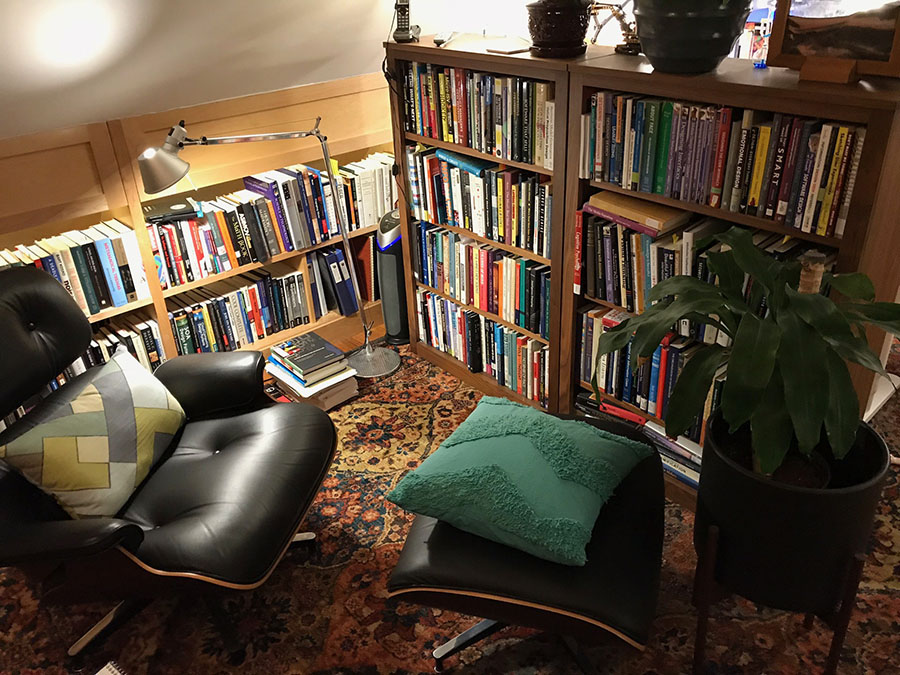
(Click for larger.) About 40% of the books in the office. There's another short bookcase like these on the other side of the desk.


About 40% of the books in the office.


Reading chair near the bookcases.


Switch detail. 17 Ethernet drops, 3 phone lines. There are two internal networks with separate routers, one corporate and one for the rest of the house.


Network closet with heavy virtualization boxes. Only the small boxes in the foreground are running Linux, the rest are all hypervisors. 62 GB of RAM in this closet. 90 VMs, 12 or so are "real", the others are just test.


Drobo Pro with 6 drives.


Storage on the other side of the closet. Mostly cables and computer hardware.


Ergotron LX and DS stands.


Outlets above desk level for portable electronics. In the middle are a pair of Belkin surge protectors with built-in USB chargers.


Pocket door without a pocket.


This is what it looked like before remodeling, the day after closing on the house.


Some of the middle walls knocked out. Discovered the ceiling wasn't insulated.


Ceiling removed in preparation for vaulting & insulation. All the old BX wiring was removed.


New strapping and wiring. Here you can see 4x15 amp circuits, a speaker wire, the 4 phone lines, and a bunch of Ethernet runs.


On the right are 3 outlets that are 35" from the floor so that they clear the surface of the desk. The 3 gang on the left is 3 different 15 amp outlets, and the 2 gang is 4 phone + 2 Ethernet.


Left: Ethernet runs going into the network closet.
Right: Insulation in place. Some aluminum "bubble wrap" was stapled onto the strapping after this, before the sheetrock went up.


A number of people have said "you should stack monitors vertically." Back in 2005, I experimented with stacking, but I just found it to be too overwhelming.


My office in Santa Clara, CA. Lacking in equipment at the moment!
More pictures here.

General

What do you use all of those computers for out of curiosity?

I write distributed software systems for commercial data centers.

I work at home--I telecommute. Right now I am working on a start-up in California (but live in Boston). I've been doing California start-ups for 8 years and lived in California most of that time. I did try living in both Boston and San Jose (Cupertino, actually, across the freeway from Apple) for a while, but after 80,000 miles on planes, I was tired of commuting every week and moved to Boston. Sadly, I've flown another 100,000 miles back and forth since writing that previous sentence, but at least Virgin America makes the commute more tolerable -- Nov 2009.

I'm really a unix programmer (most of the time anyway), just happen to use a Mac to front-end to the unix boxes.

Hiring update: I am looking for software, QA, and tech support engineers in the SF Bay Area.

This office is over the top.

It is. But it's fun. I'm in here 60-80 hours a week during crunch time. It's way less depressing than long hours in a cube farm with an uncomfortable desk and phone books to boost the monitor height. Since I work at home, I don't get to play in a data center of prototypes systems, so I had to build my own small data center. ;-)

Seriously, after many years of programming at tables that were the wrong height, looking at small monitors, listening to loud computers, typing on vanilla cramped keyboards that hurt my shoulders, sitting in falling-apart chairs, I decided enough was enough.

Some people have over-the-top cars, I have an over-the-top office.

How big is the office?

Overall, it's about 26 x 14 ft. The vaulted ceiling is about 10 ft high. The network closet is 7 x 9 ft.

What chair is that?

Herman Miller Aeron, fully adjustable. Bought used on Craigslist. If you're shopping for used Aerons, beware that they come in 3 sizes. There are also the "basic" and the "fully adjustable" models. The latter usually come with a lumbar support or a "PostureFit" support.

What desk system is that?

It's from the Bush Furniture Series C collection. From the set, the office contains the 72" bow desk, a 72" credenza, a 36" return, the 72" right-corner module, a 3 drawer free-standing pedestal, a 2 drawer attached pedestal, two 30" storage cabinets, a 36" lateral file cabinet, and a pencil drawer. I built a small "desk extension" that makes the 6ft bow desk 7 ft wide for a little extra surface. Overall, the entire desk footprint is 12 ft x 8 ft.

What keyboard tray is that?

It's a 6 ft 1x12 board from Home Depot ($10) and 4 2" L-brackets ($5?). 8 screws hold it onto the desk, though for a long time there were only 4 screws. It's very robust (no flimsy bounce when typing) and has plenty of room.

You built a cubicle in a huge room! / What is the workflow? / Do you really need so many desks?

The basic layout of the desk is an 'L' up against a 'U'. The 'L' is for task processing and brainstorming: Dealing with incoming requests, filing, and organizing happens at this desk. For filing, there are two lateral file drawers (personal and brainstorming) and a two pedestal file drawers (corporate records) within "swivel distance."

The 'U' desk is where work happens: The MacBook Pro + the middle 30" monitor (it's on a KVM) is for writing documents, updating spreadsheets, preparing presentations, keeping the books, and other administrative tasks. The 6 monitor Mac Pro is for coding, debugging, and customer support sessions over WebEx.

Physical separation helps me stay focused. The physical separation also puts my mind into a state of knowing anything piled up on the 'L' needs to be dealt with and so aggressive use of the trash can and filing cabinets prevents accumulation of huge stacks of clutter that never get moved.

I am using David Allen's Getting Things Done model for processing tasks; I rely on the Mac/iPhone combo Things and two letter trays on my desk for "in" and "next" processing stacks. David Allen says to buy the cheapest label printer that plugs into the wall, but I splurged and spent $100 to get one that doesn't waste so much tape. I use the label printer pretty heavily on labeling files, and make it a point to keep about 500 new manilla folders ready for filing. I have also found that keeping an industrial shredder--not a cheap $20 one--helps me reduce clutter by letting me quickly destroy confidential documents. With a cheap shredder I would inevitably pile up documents to shred but never actually do the shredding.

Too much light / too loud / too hot.

Lights: The lighting is all balanced against the monitors--the monitor and ambient light are roughly equivalent. The lights are controlled via X10 and I can quickly change the lights in the room from any web browser or a physical remote control. Eye strain is very minimal.

Noise: In the office, there are only two computers--the laptop and the Mac Pro. These machines are extremely quiet. The rest of the gear is in the closet, which has a door that closes. Rubber matting reduces the resonance of the fan/disk noise across the wood floors. The Mac Pro in the office itself is on the other side of the desk from where I sit.

Heat: The temperature in the winter is about 65-75 F--by far the warmest room in the house; during the winter, window fans on timers pump cold air in from outside. In the summer, there's 2 tons of A/C to keep the office cool. The closet and the office are separate thermal zones; the closet stays at around 68-72 F and the office 72-78 F. It's very comfortable.

What about windows?

There's two pretty large windows at each end of the room and a small window in the closet. I did consider putting in skylights, but the roof outside is in very good shape and I didn't want to mess with it. I also had a very small "window" of time allocated for remodeling; only about 4 weeks to do the whole house.

There's always compromises, and it's very hard to find a house in this area of Boston with a large enough space for an office like this. Often times when I've had windows in my office, whether at home or in a corporate building, I've ended up covering them to cut down on glare. The 11 lamps + 6 can lights in the ceiling definitely provide plenty of light, even if it's artificial light.

It doesn't look like there's much shelf space.

There's 39 linear feet of bookshelves in the office, and 16 linear feet of storage shelving in the closet. There's also two storage cabinets in the office with about 10 feet of shelving that is 2 feet deep.

Monitors

Why not go with virtual desktops instead of physical screens?

First off, I do use virtual desktops on the MacBook Pro, and I also use virtual desktops/consoles inside of VMs and on machines in the server closet.

However, I am, generally speaking, not using virtual desktops on the 6 monitor machine. Sometimes I do keep 2 Spaces going when two very different coding activities are going on. But frankly, Spaces is pretty bad when you want the same application with different windows/documents in different spaces.

I've used virtual desktops heavily in the past even on my primary coding machine. Mostly I need concurrency in what I am seeing. Watching cascading crashing, seeing a few gdb sessions + code, etc. Virtual desktops don't solve the concurrent viewing. When I don't need concurrent viewing, I use tabbed terminals quite a bit.

Spaces works OK on the MacBook Pro with 2 displays because I am doing a bunch of different tasks such as writing reports, bug triage, email, PowerPoint, to-do list management with Things, Mail, WebEx, iTunes, etc. These varied tasks benefit from Spaces. However, Spaces and other virtual desktop implementations are not as beneficial for working on the software products in the way that I work. I do use tabbed editors and terminal windows where I can get away with it.

Of course, if I couldn't afford a lot of monitors, I can work on a single 17" monitor with 8 or so virtual desktops (and have done so)--but it really sucks. This lets me get through the bugs and issues a lot faster with less pain. Debugging is painful enough as it is--there's no reason not to add as much hardware to ease the pain where possible.

Did you have to do any software tweaks [for the portrait mode displays]?

Modern Mac hardware/software supports rotation with no additional tweaks. Look in the Displays System Preferences; you can pick an orientation for a monitor (90, 180, 270 degrees).

How much do the monitor stands cost? where did you buy them?

On the desk, the monitor stands are Ergotron DS100 and Ergotron LX arms. They are very sturdy but a little expensive. Try Amazon, NewEgg, etc. I do not recommend the Ergotron Neo-Flex line. Spend a little more and get a vastly better product. (For sale: Two Neo-Flex laptop stands.)

In the closet, the monitors are mounted to the wall with $10 mounts from Monoprice. They are very sturdy, but not very flexible.

So how are the 6 monitors driven?

The 6 main displays are connected to the Mac Pro, which has three ATI 2600 video cards. The middle 30" is plugged into a KVM and is shared with the MacBook Pro.

How many monitors total?

7 on the desk (1 x 15" laptop, and then the 6 on the MacPro).
1 projector.
3 in the closet.
1 in the basement with some loud rack-mount disks.
So that's 12 total in use.

In the middle there is an Apple Cinema display... and the others?

From left to right (in some of the pictures): laptop, HP LP2065 20" (x3), Apple 30" (x2), HP LP2065 20" (x1).

The HPs + Apples = 9220 x 1600.

What's with the projector?

I stole borrowed the projector idea from this guy. I do a lot of presentations and thought the projector would be handy--it's very portable, light, and uses an LED bulb (so no expensive $300 surprises). It was the above link that made me think it would be handy for more than just color checking of slides and rehearsing talks.

Sadly, even a cheap projector costs a lot. I couldn't justify a used one because there's so few (zero?) used LED units on Craigslist, and a used one + replacement bulb was more than a new LED unit. However, the projector screen was silly cheap--$77 at Amazon for an 80" 4:3 screen. 16:9 would be much more trendy, but less real room, given the ceiling constraints I have.

I am still exploring use cases for the projector. Stay tuned.

Do you run all [of the 6 monitors] at native resolution, or matched vertical resolution?

Except for the laptop, they are all 1600 pixels tall. So yes.

Don't you lose track of the cursor?

On the Mac, I turn on the big cursor (System Prefs > Universal Access > Mouse, then use the Cursor Size slider).

It's ugly, but my arm gets less tired--when the cursor was the old 16x16 size, I would shake my arm hard looking for it. Now at around 96 x 96, it's a heck of a lot better. There's a freeware Mac tool called "Screen Crosshairs" that I tried for a while, but it's ironically(?) broken on multiple monitors.

You should use [the software called] synergy!

I have in the past, but it doesn't make much sense for my current situation.

OK, it looks cool, but I bet you won't like it once you use it. / Too much neck/wrist pain.

I've been using the set-up for over a year, and I've running 6-8 monitors for about 5 years. No neck pain, no wrist pain these days, especially with the Kinesis keyboards. Check my Flickr pictures for pictures of old offices set-ups and experiments.

I've found doing as few as 10 push-ups every day also alleviates some of the tightness and fatigue in the wrists and forearms (as well as having other good side effects). This is an unscientific observation and is not medical advice. But it helps me, so I have a yoga mat at one end of the room for when I don't make it out to the gym.

Some folks have mentioned it looks like a 'just-completed' project because it's so clean/de-cluttered. I de-clutter the office once a week. Otherwise I go nuts.

Computers

What are the specs of the Mac Pro?

8 x 2.8 GHz cores, 24 GB of RAM, three ATI 2600 video cards, 6 monitors.

The Mac Pro has a lot of storage--about 12 TB: 2 x 2 TB external FW800 WD RAID-1 drives that are striped in software for a redundant 2 TB Time Machine volume, 2 x 1 TB internal drives with my home directory, 2 x 500 GB internal drives for VMs. The Mac Pro also mounts an iSCSI LUN from the Drobo Pro in the closet. The Drobo Pro volume is 8 TB with 4 TB of real disks behind it. Performance of the Drobo Pro seems to be very good for its price point (i.e., it's not as fast as $25k disk shelves, but it's also a lot better than what you usually get for $1k).

I can't believe you use Macs. Macs suck. You are teh loser.

I've seen this comment a few times, which is a little funny--I have an MSDN OS subscription ($700 first year + $500/yr renewal) and dozens of Windows VMs for testing. I probably have more Windows installed here than most people hating on the Mac.

I mostly am using a Mac Pro for the main desktop because (1) a key piece of my development environment only runs on Windows and Mac right now (2) I hate Windows (3) X.org's RandR support is missing hwaccel on a lot of video cards. :-(. If I could cross-grade some of the key software with minimal charge (re-buying it doesn't make much sense to me), and RandR was better, I'd switch to a Linux desktop in a second. Ubuntu 64-bit desktop does in fact boot on the Mac Pro out of the box and it's pretty nice, but without hwaccel RandR, portrait displays don't make much sense on Linux. Fonts under Linux still suck, too, though the situation has improved some. For better or worse, I spend most of the day looking at Courier, anyway.

Even if the programming desktop were a Linux hosted OS, I'd still have a Mac or two on the side for Photoshop, Dreamweaver, Pages, Keynote--the last two are pretty kickass applications. They obviously are limited for sharing source files, but if sharing annotated PDFs is good enough these apps are fantastic. I also like Apple's Mail program, sort of--it's not very good, but no worse than Eudora was in 1995, doesn't seem to have some of the corruption issues Entourage has, nor the ugliness and slowness of Thunderbird.

I would suggest not buying into the computer religion too seriously. These are just tools. I've tried dozens of them. I use what I use for pretty specific reasons--and it's always a compromise.

How many computers total?

There's 1 Mac laptop and 1 Mac tower in the room + 10 PCs in the closet. So 12 total.

What are the specs of [other systems]?

In the server closet, there's a 7 systems with a mix of Core2 and Xeon processors, all of which have 8 GB of RAM and various hard drives. The home-built machines have ASUS motherboards, the Dell boxes are cheap servers from Dell (which I highly recommend--great performance, good construction and performance, low prices if you catch them on sale). CPU speeds range from 2.1 to 3.0 GHz.

There's a pair of 1 GHz Athlon "shuttle" style systems that do low-CPU work (DHCP, DNS, bash environment on an NFS export, low-end DMZ services, X10 interface, a poor man's "serial concentrator" server for the other boxes with Minicom scripts and an add-in RS-232 card, etc. This box also runs dnsmasq, some home-grown network monitor / management tools, and MRTG that monitors the managed switches, etc. I have written some nice tools that plug-in to dnsmasq; I hope to release them "someday.").

The MacBook Pro is a 15" model 2.2 GHz Core2 Duo with 4 GB of RAM and a 500 GB internal hard disk that I installed.

Overall I think there's 28 cores and ~80 GB of RAM as of this writing. Maybe 30 TB of disks? Not sure. Most of the drives are in RAID-1 pairs and some are RAID-0+1, so logical space is significantly less. With heavy use of iSCSI from OpenFiler, NFS exports all over the place, I really don't remember how many drives are in most of the computers. I know the Mac Pro has 8 direct-attached drives. Most of the other machines have 2-4 drives.

There used to be a 24" iMac but I decided to sell it and buy another 30" monitor + the 500 GB replacement hard drive for the laptop.

Why so much hardware? Much of the stuff in the closet is shared with my colleagues for load and performance testing. Our software is installed on pretty high end gear (what you see here is nothing in comparison), so it's good to have some dedicated hardware that loosely resembles the customer environment.

What flavor of Linux?

When I run Linux on native hardware, I usually install Fedora 8. VMs run a mix of Fedora 8, 9, 10, Ubuntu 7 and 8, Windows 2003, XP, and 2008. However, most of the PC hardware is running VMware ESX 3.5 and VMware ESXi.

Can't you just run all of these machines as VMs?

I am using VMware very heavily. I have about 80-100 (!) VMs on the network, which is just too much to shove onto a single system. Why am I running so many VMs? Because my company is writing software for data centers running big deployments of virtual machines.

Unfortunately, virtualizing hypervisors doesn't work so well (horrific performance when it does work; but I haven't had any luck at all getting a guest VM on Xen to boot in Fusion, for example). I am running some ESXi hypervisors in virtual machines, but it's not fun.

How much does your electric bill run you each month with all of the computer equipment?

It's not cheap. :-( But it is a partial tax write-off (according to my accountant; this is not tax advice). The computers are relatively lightweight--12 boxes + the monitors only draw about 1700 watts. If you compare this to the bad old days where three 21" CRTs would draw 400-500 watts, this is pretty good.

All of the lights are CFLs except for two 20 watt lamps (I have 60+ CFLs in the house). The A/Cs and laser printers usage of course puts on extra load; I'm not counting that here. The A/Cs at full blast draw about 2500 watts, but that's only when it's > 95 F outside--not too often here in Boston. There's ~11,000 watts of capacity in the office, so it's safely under maximum possible load. Power is well distributed across the circuits; no single circuit is over 50% utilization.

For those concerned my carbon footprint is very high, I do compensate a little with a Rinnai tankless water heater. Gas for the water heater is about $6/mo--significantly less gas is required for this than keeping 40 gallons of water hot 24x7. Most of the light bulbs in the house (and the office) are CFLs. Also, because I work at home (and live where there is a good subway system), I hardly ever drive my car. A tank of gasoline lasts me 6-10 weeks. I drive rental cars when I travel more than I drive my car at home.

If I still lived in California with the non-linear PG&E electricity pricing, I'd definitely be investing in solar. However, I am not sure the benefit is worth the cost for my current situation. If I ever move back, it will be a no-brainer to buy 15 200+ watt panels.

Do you use Textmate?

I've tried it and love the flexibility of syntax coloring that it offers. However, I'm too entrenched in vim and BBedit to make the switch though. I don't use Emacs, sorry. :-)

What keyboard is that? How much do they cost?

I have two Kinesis Freestyle keyboards (Mac version) that Kinesis customized for me--they put in a 20" cable instead of the 8". I used to have a PC version with the 8" separator and it was too short. The 20" version costs a lot ($40 more), but it's worth it.

The key switches are decent and I find these keyboards extremely comfortable. They were around $180 each w/ shipping.

I bought them directly from Kinesis. I've never seen them in a retail store. Some specialty ergo shops sell them online, but I haven't bought from those stores.

What's in the rack?

Linksys RV082 router (dual WAN, VPN with a lame 5 user license), HP ProCurve 1800-24G GigE switch (for the office & server closet; it's web managed w/ read-only SNMP, sadly no CLI or RS-232), unmanaged 16 port NetGear GigE (rest of the house), and a patch panel. The cables are somewhat color coded; for the most part, orange cables are DMZ, yellow are server room test hardware, green are 2nd interfaces to server room test hardware, white are uplink cables between switches, and blue are generic patch cables. I will get around to labeling stuff one day.

The Linksys RV082 gets a lot of bad reviews on Amazon, but I've been happy with the speed, stability. The only complaints I have are that I've not found a way to adjust the socket timeout value and the usual complaint about how VPN devices are licensed.

Why not rack mount everything?

Some of the stuff is in a small 4U wall-mount racks which run about $35 from CDW (and even less from Monoprice). The utility of racks are not lost on me, but real free standing 4 post racks are expensive--and rack mount machines tend to be extremely loud. Right now I have enough space to spread out without needing racks and the expense of the racks, rails, shelves. Monoprice sells some 2 post racks for not much money that look interesting. In theory they are free-standing.

I didn't see a [wireless access point].

There are 3 AirPort Expresses throughout the house.

What software applications do you use?

This is a bit of a long list. It's probably not much different than what most folks are using; I've tried to provide links for some of the apps that might be lesser-known.

The two most important apps I use are Things and Address Book. These with Mobile Me and iPhone syncing are critical to keeping me on top of what I'm supposed to be doing.

Productivity: Path Finder, Things, ControllerMate (for the ErgoDex w/ custom scripts), Pages, Keynote, Numbers, OpenOffice, Photoshop, Dreamweaver, OmniGraffle, QuickBooks, and Excel, PowerPoint, Word. Recently I've been experimenting with ActiveWarehouse ETL in Ruby for refining data sets; it seems to work pretty well and is very simple.
Communication: Gmail for Business, personal Gmail, Salesforce.com, Mobile Me, Skype, iChat, Google Talk, WebEx, Adobe ConnectNow, Safari, Firefox.
Server: VMware ESX/ESXi/Server, VI Client/Virtual Center, MRTG, Nagios, Fedora, Centos, Ubuntu, snmp, a lot of custom scripts, Terminal, PuTTY, xterm, OpenFiler, ntop, NFS, Samba, Apache, etc.
Development: gvim, Bugzilla, CodeStriker for code reviews, Trac (for timeline and browsing only--Trac for bug tracking is a total joke), MediaWiki (overly complex), vi, Balsamiq Mockups for UI mock-ups, RoaringDiff, BBedit, Eclipse, Xcode, Flex Builder, sqlite, mysql, VMware Fusion, gcc, make, rpm, bash, python, perl, php, awk, Zterm, minicom, other GNU userland tools.
iPhone: Things, Mail, Remote, Amazon, Stock Quotes, Address Book, Notepad, Maps, TwitterFon.
And of course, iTunes and the iPod/iPhone Remote app. This combination is awesome and far more useful than the iTunes UI itself. Outside of the office, I use Hulu and NetFlix heavily on the HTPC in the living room.

You might notice I didn't mention many spiffy Windows tools like Notepad++ or TortoiseSVN -- I just don't do that much on Windows beyond testing, VMware administration, and WebEx. If I do have to develop on Windows, Cygwin is a life saver so that I can run bash, xxdiff, etc. Sadly, it seems Cygwin isn't getting much attention these days.

Construction

Why straight drops instead of conduit?

Good question. Probably a combination of things: (1) I didn't have much time for the remodel, so planning was short--I didn't really think of conduit. (2) Keep costs down. Also, I suspect that in-wall conduit would have required thicker walls in some areas, and visible conduit is just ugly.

I don't view this as my ultimate office, just a pretty darn good office. Maybe next time around. :-)

How much did you spend on ripping out the attic? like with plastering and wiring and fans, etc.?

It was fairly cheap. I've learned that contractor rates vary quite a bit from area to area, and it's hard to say exactly what was spent on the office because I did the whole house. But the attic work included new walls, ceiling, insulation, vaulting the ceiling, new fans, new lights, all new wiring, the sub panel, Ethernet drops, put down a new floor in half of the room, sanding the floor, stain, poly, drywall, plaster, paint, trim, the doors. It sounds like a lot--and it was--but I think the contractors gave me pretty good pricing. 2008 was a pretty slow year for them (as of April).

Obviously I am dodging the question, but I will say if you can afford a pretty high end system that you spend a lot of time working at, it's worth checking into the cost of remodeling the room you use it in, if the room is not a suitable environment as is. You might be surprised. After years of "making do" with terrible office situations, this has been a nice change.

There may be possible tax savings for remodeling a home office depending on your circumstances; talk to your accountant. [This is not tax advice.]

Where did you get those fans?

The fans are made by The Modern Fan Company; I bought them from form+function.

Aren't you worried with that many PCs that eventually SOMETHING will burn up while you are away?

No. I assume that this question is really about electrical overload: There's a 60 amp subpanel in the office, and 6 circuits throughout the room. The electrical load is fairly well balanced, and I am slowly upgrading to metered 1U power strips throughout the room. The biggest worry is pushing too many amps through an under-rated cord, and I deal with this by only using 15 amp cords. Recently I've noticed some of these cords rated at 15 amps are quite warm with 8 amp loads, so I'm replacing them with commercial-grade cords.

All that remodeling and you painted the walls white?

The walls are "silver plum"--a light gray. It doesn't photograph so well with my lame photography skills, CFL bulbs, and a cheap camera. Why no accent walls? Mostly because I haven't figured out what I want for colors. I was also worried that the drama of the room might be too much with colors added to it. So for now, off-white it is. The ceiling is just "ceiling white".

Misc

An office for one person? You're not sharing it with anyone?

My girlfriend has her own office elsewhere in the house. Her room is also a dedicated office with a door that closes, perhaps around 13 x 13 ft, wired for Ethernet, colors of her choosing, etc.

No, I will not post photos of her or her office. :-)

No fridge / wet bar / bathroom?

I thought about it, but as a friend of mine said during the remodel, "Don't build a house within a house." It's good to take a break and get out of the room for a few minutes.

Physical security?

There are a number of physical security measures that are implemented, but I'm not going to elaborate.

Do you like writing software? I'm kind of considering something computer-based when I go to college. but not really sure...

Yes, it's about all I've ever wanted to do. It's not for everyone though. A degree in computer science is (or used to be :-) ) a lot of work, especially in math. I struggle with certain aspects of math, but I managed to get through it and had a meaty chapter in my thesis about quaternions. In general I'd suggest double majoring if you can. I often wish I had double majored in CS and Latin.

The day to day aspects of writing software is very different from a CS degree. I enjoy both though. There's a lot more to CS than "computers"; CS isn't really about programming at all. But to be an excellent programmer, you'll need to understand the science of computing, somehow.

I'm trying to decide if I should go to college / start a company / switch jobs / other career advice

I'm flattered you want to ask me about this, but I suspect you'd do better to ask on a web site such as StackOverflow and/or people who know you well.

Also, one minor detail: "awesome office" doesn't necessarily imply "awesome person." It's possible I am clueless, but have a nice office.

I do have a bit of free advice about college though: Go to college! Understand that college is the one time you will be around a lot of single people. Once you're out of college, the number of available people to date goes down. Way down. There's no reason to get a big hurry to start working. Go to college. Chill out. Meet people. Even if you're already the world's greatest hacker who doesn't want to date or meet anyone, realize that college is 4 years you have to hack with almost no interruptions. Live on campus, wear headphones, and hack. Crawl down to the cafeteria, get food, go back to hacking. Or meet girls. Either way, it should be a lot of fun.

Ice bucket and mini wine decanter are my favourite accessories here. Or is that a vase?

It's a cheap Riedel Merlot 34 oz decanter, though I think of it as a carafe since there's no stopper for it.

You drink too much Coke Zero, which contains Aspartame, which causes cancer!

Yes, I drink too much Coke Zero. There has been controversy over Aspartame for some time. I try to drink a lot of seltzer and regular water, too.

I am a big fan of Diet Coke with Splenda, but I haven't been able to find it in stores for some time.

That's a lot of lamps.

Yes. There are 11 lamps in the room, nearly all controlled with X10 modules. They are currently run by cron to turn on in the morning and turn off at night, but the cron scheduler can be overridden with some physical remotes. I'm working on throwing together a little iPhone UI to provide better control over the lights in the office and the rest of the house; I'm still working on replacing wall switches for key security lights and so on.

It's true X10 isn't the most reliable protocol in the world, but it's darn cheap. And by having cron turn the lights off at night, it helps me remember to get to bed at a reasonable hour. The clock on my desk is 3 hours behind my timezone, since most of my co-workers are in California. This can play games with my mind during late night debug sessions.

Where can I buy X10 gear? x10.com frightens me.

x10.com frightens me as well. I mostly buy from www.thehomeautomationstore.com. I've bought about 20 modules from them and they seem to be a good vendor, but I don't really know anything about them. There is also SmartHome (retail in Irvine, CA) and HomeTech (retail in Cupertino, CA). These two vendors are pricier.

If you want a "reliable" automation system you might consider Insteon over X10. (Update: I've seen a lot of compalints about Insteon hardware being short-lived, do some research before taking my word for it.) I'm cheap and went the X10 route though.

How do you control X10 from the computer?

I am using bottlerocket on Linux with some lame scripts + cron. The hardware bridge is the X10 firecracker module (RS-232-to-RF).

Why did you write a FAQ? Do you have too much free time?

This FAQ was inspired by Stefan Didak's Home Office FAQ. I never understood why he had a FAQ until I decided to share pictures of the office--suddenly, the questions above were coming in rapidly and frequently--and I understood the need to pull together the common questions.

Usually the FAQ is updated during bouts of insomnia.

Why share the office pictures if it takes up so much time?

Short answer: I have met some really cool people as a result of this office page. And no, none of them have crazy offices (or if they do, they didn't mention it).

Long answer: Nothing exists in a vacuum. Back in 2007, blakespot posted this picture of his HP 20" + Apple 30". It was from that picture I got the idea to use 4 of the same HP monitors with an Apple 30". Stefan Didak's notes about his HP ProCurve Ethernet switch resulted in upgrading to the same switch he is using. I didn't know about Ergotron stands until I saw a picture of them in someone's set-up. I never would have thought to install in-wall speaker wiring and wall plates in the living room or the office without the folks posting pictures on avsforum.com. I learned of the Ikea Signum cable trays from this LifeHacker post; otherwise I would have spent 4x as much buying server room cable raceways.

It is my hope that many people will learn something from what I've done to improve their own situation. I'd love to see pictures / write-ups of how you have maximized your productivity / design / space / sanity in your space, whether you have 1 monitor or 30.

Other impressive offices?

Will you design an office for me?

You'd probably do better to hire a professional; I'm just a guy with a few desks, a big room, and a lot of monitors. What works for me may not work for you. Feel free to use any of the ideas presented here.

I am starting a company, any advice?

This is a little off-topic but I tried to keep the below as brief as possible. Please note this applies to companies building products; consulting businesses are a little different.

First, you need to be sure you are building a product people want. This means market research and talking to potential customers before you do anything else. It sounds obvious, but building something people want is the hardest part.

If you are serious about starting a company to the point that you or your partners are quitting your jobs, you need to go ahead and legally form the company. You can "do it yourself" but I recommend finding a respected attorney familiar with the law of where you are starting your company. In particular, you should have employment contracts between all partners and the company, and you should have intellectual property assignment agreements between all contributors and the company.

Without these basic agreements in place, your company can suddenly be in a position of being (1) un-fundable by VCs or other capital sources, (2) un-acquirable, (3) sued by a partner who has dropped out or feels he has been wronged. And of course, without some non-compete agreements, a partner can leave and potentially take know-how of your business to start a competing company.

Do not depend on a 'gentleman's agreement' of what will happen when someone leaves--even if everyone trusts everyone and everyone has known everyone else for many years. In every company I have ever started, someone has left before the first product was ready to go to market. In one case, that tanked the company and the remaining partners, including yours truly, lost many thousands of dollars.

Setting up a company and getting these agreements in place is relatively cheap, even with a high-end law firm in an expensive city. The cost is essentially zero compared to other start-up costs and it will save you serious stress and money down the road.

Hire an attorney who specifically deals with business. I would not hire a "front door attorney" who "practices whatever comes in the front door." Ask for references from businesses that were once starting out like yours. Also, you will need a CPA to keep you in-line with the IRS and other government agencies. The CPA will cost you much less and, in some ways, be a far greater value. I wouldn't start a business without either of these people on my "team". I've done it the wrong way and the right way--and the right way is MUCH better and less stressful.

When you're just starting out, it can be very easy to fall into the trap of thinking that what you're doing isn't going to be "big" or "maybe it's not important enough" to be worth protecting. But if you have quit your job to do something, it must be big and important enough to justify taking some basic precautions such as these. Chances are living expenses while you build your product will dwarf the costs of protecting yourself--there's just no reason not to.

Of course, if you're building a company alone, you might not need much of the above--I am really referring to scenarios involving 2 or more people. If you're going at it alone, you might still need protection from contractors you hire, though.

See also: Top Ten Legal Mistakes Made by Entrepreneurs. I also recommend this book which covers the above scenarios and many other issues.

Finally, this is not legal advice.

Who you are?

My name is Mitch Haile. You can follow me on Twitter.

I have a question that wasn't answered...

Feel free to post the question on Flickr or write to me at mitch.haile@gmail.com.

Please try to keep your mail succinct. I'll try to humor you if you send me your life story, but I may not find your question buried in it. I do try to reply to all questions, up to about a limit of 3 questions / 1 email per person.